ShopDreamUp AI ArtDreamUp
Deviation Actions


Suggested Deviants


Suggested Collections


You Might Like…



Description
Dios Afi = Zeus Touch
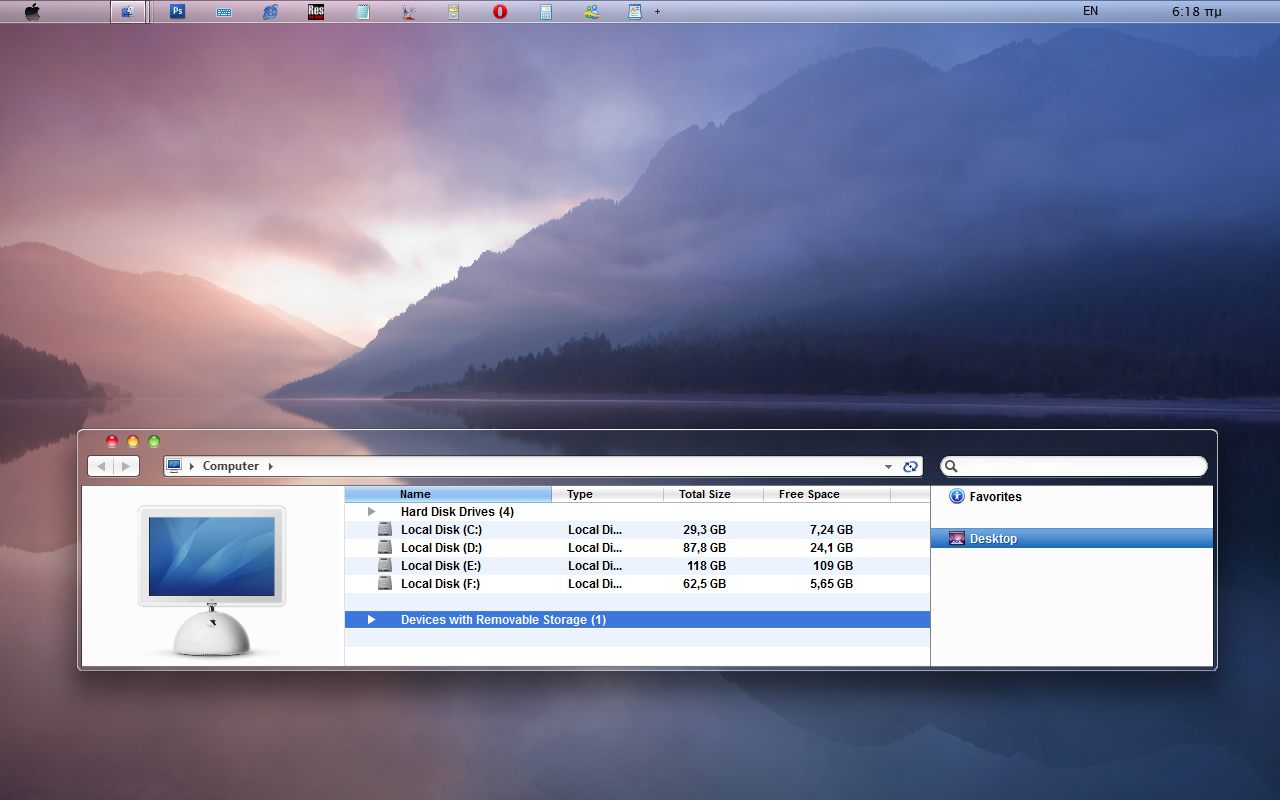
Dios Afi = Zeus Touch is based as an inspiration from the Lion mac os X Developer previews and made under my personal view.
This version made for using to sp1 Windows 7 system, with main characteristic the setting of Navigation Pane to the right part of explorer's window. --> not an osx characteristic (since now)
this modification has been made having in mind that right hand users who use touchscreen computers , asked for having propertree (of Navigation Pane) to the right, as it is more comfortable for them, its more near to their hand the right part of a window, so they can ease and quiq select a shortcut directory from propertree.
many thanks to Panda X [link]
MADE IN GREECE (= Hellas).
---------
This is a registered and copyright property
© copyright - All Rights Reserved
MCN: CG5NA-6AS53-5G8QB
'MyFreeCopyright.com Registered & Protected'
Please USE it only to your COMPUTER SYSTEM as is.
Do not modify, edit , copy it or change the name or the images or the code of it, or use it to any project or copy it anyway in any meaning.
DONATE [link]
******
-----------------------------------
Attention : THIS WORK its not a stand alone work.
IT HAS BEEN MADE FOR USING together with my ''sp1 ZEUS osX for Win 7'', just replacing the shell32.dll of your system and use this from this pack for setting Navigation pane to the right part of explorer, Details pane to the left, and preview pane to the mid;le top.
otherwise add only the themes.
so depending if your system is a 32 bit or a 64 bit one, you must first download my sp1 ZEUS osX for Win 7 32bit [link] or 64 bit [link] and follow the instructions of them.
from this theme just copy paste the themes,wallpapers and the shell32.dll
so : Because some users who use my sp1 ZEUS osX for Win 7 32bit [link] or 64 bit [link] want to have their Navigation pane to the right, i have modified two 32 bit sp1 microsoft shell32.dll (code) to this pack for any user uses 32bit version of Windows 7 and i also have included an already modified two 64 bit sp1 microsoft shell32.dll to this pack for any user uses 64bit version of Windows 7
1. if you choose the shell32.dll named : 1. shell32.dll no visible folderband , that means that your folderband will be not always visible, it is included to the preview pane that existed to the top. for appearing both the folderband and the preview pane, just press to your keyboard (or your : on screen keyboard) the combination of : Alt + P
2. if you choose the shell32.dll named : 2. shell32.dll always visible folderband , that means that your folderband will be always visible, please see screenshot included to the pack.
--
if you are not an experienced user and you dont know which one to choose, then choose number 2 and select the shell32.dll from the second folder named 2. shell32.dll always visible folderband
-------------------------------
THEME CATEGORIES AND IDEA BACKGROUND
Dios Afi = Zeus Touch
Main categories of visual styles of this pack: Transparent.
Name and styles of Themes:
Afi [=touch] - 2 versions ---> transparent
the names of the visual styles/themes are based to the ancient and modern Greek language
IN ancient and in nowdays Hellenic (=Greek) [Active CODE] language, every letter, and every word is a specific number, and it has a specific meaning.
ZEUS ( or DEUS or DIAS) is Master of immortal Gods in Hellenic (=Greek) Active CODE [arithmetic machine logic] language, and APPLE is the given gift from ZEUS .
Afi means Touch.
So the name of the THEME choosen from Hellenic = GREEK language and civilization.
-------------------------------
EXPLANATION DESCRIPTIONS
My work is based on the spirit of os X, and not a copy of it.
Many images are designed in a similar but not same way with original os X.
I use font bold style in many places that original os X use regular font style.
I made this project to work only to 96 dpi font size.
For this project i have spent thousands of hours, and perchaps it is first time in the history of Windows, that without any 3rd party program or explorer replacement, we have a so much close to mac os X style approaching.
This version made having in mind touchscreen machines.
The theme will have some limitations in use, as i have not enough time to complete in the way i want,.
===================
so:
UNZIP all files, using freeware 7z [link]
Then go to Control pane [view by category] -->so Go to Control Panel\User Accounts and Family Safety\User Accounts and press the folder 'Change User Account Control Settings' set the slider to the next window Never Notify.
Restart
Copy all the folders included in the folder Macos X style Themes by ZEUSosx'[after unzip all files, and copy them to C:\Windows\Resources\Themes ,provided C is your Windows drive).
so copy all the folders that are inside in the folder Macos X style Themes by ZEUSosx, and paste them to C:\Windows\Resources\Themes
copy all the folders that are inside in the folder Wallpapers, and paste them to C:\Windows\Web\Wallpaper\Mac os X Wallpapers
--------
a. Obtain Permisions and Ownership of shell32.dll that located in C:\Windows\System32
( example of taking ownership to a random system file
[link] , internet explorer compatible) also text of how to take Obtain Permisions and Ownership included to the pack.
b. Backup you original shell32.dll by renaming them to shell32.old2
Copy the new shell32.dll from this pack to C:\Windows\System32
restart.
(for 64 hit users only : there is another shell32.dll to your system located to c:\windows\syswow64 and this must be replaced from the 32bit version shell32.dll that existed on my pack as the files of c:\windows\syswow64 are 32bit ones!!!)
====================
so:
32 bit users please follow the I N S T R U C T I O N S SP1 (32 BIT Version) TEXT [link]
64 bit users please follow the I N S T R U C T I O N S SP1 (64 BIT Version) TEXT [link]
==========================================
Please USE it only to your COMPUTER SYSTEM as is.
Do not modify, edit , copy it or change the name or the images or the code of it, or use it to any project or copy it anyway in any meaning.
By downloading this Visual Styles/themes,and shell32.dll, you agree to the following conditions:
- This Visual Styles/themes, and shell32.dll, are free for personal use only.
- It must not be used commercially.
- You can distribute it for free as long as the files are unmodified and this text file is included with the zip file.
- You may not sell them or use them for profit.
- Do not take credit for creating this Visual Styles/themes, and shell32.dll,
- I am not liable for any sort of damage to your computer from using this Visual Styles/themes, and shell32.dll
so please respect my work.
Thank you All of you, for your support.
Made in H E L L A S (= Greece ).
Inspired by Zeus.
DONATE [link]
******
Dios Afi = Zeus Touch is based as an inspiration from the Lion mac os X Developer previews and made under my personal view.
This version made for using to sp1 Windows 7 system, with main characteristic the setting of Navigation Pane to the right part of explorer's window. --> not an osx characteristic (since now)
this modification has been made having in mind that right hand users who use touchscreen computers , asked for having propertree (of Navigation Pane) to the right, as it is more comfortable for them, its more near to their hand the right part of a window, so they can ease and quiq select a shortcut directory from propertree.
many thanks to Panda X [link]
MADE IN GREECE (= Hellas).
---------
This is a registered and copyright property
© copyright - All Rights Reserved
MCN: CG5NA-6AS53-5G8QB
'MyFreeCopyright.com Registered & Protected'
Please USE it only to your COMPUTER SYSTEM as is.
Do not modify, edit , copy it or change the name or the images or the code of it, or use it to any project or copy it anyway in any meaning.
DONATE [link]
******
-----------------------------------
Attention : THIS WORK its not a stand alone work.
IT HAS BEEN MADE FOR USING together with my ''sp1 ZEUS osX for Win 7'', just replacing the shell32.dll of your system and use this from this pack for setting Navigation pane to the right part of explorer, Details pane to the left, and preview pane to the mid;le top.
otherwise add only the themes.
so depending if your system is a 32 bit or a 64 bit one, you must first download my sp1 ZEUS osX for Win 7 32bit [link] or 64 bit [link] and follow the instructions of them.
from this theme just copy paste the themes,wallpapers and the shell32.dll
so : Because some users who use my sp1 ZEUS osX for Win 7 32bit [link] or 64 bit [link] want to have their Navigation pane to the right, i have modified two 32 bit sp1 microsoft shell32.dll (code) to this pack for any user uses 32bit version of Windows 7 and i also have included an already modified two 64 bit sp1 microsoft shell32.dll to this pack for any user uses 64bit version of Windows 7
1. if you choose the shell32.dll named : 1. shell32.dll no visible folderband , that means that your folderband will be not always visible, it is included to the preview pane that existed to the top. for appearing both the folderband and the preview pane, just press to your keyboard (or your : on screen keyboard) the combination of : Alt + P
2. if you choose the shell32.dll named : 2. shell32.dll always visible folderband , that means that your folderband will be always visible, please see screenshot included to the pack.
--
if you are not an experienced user and you dont know which one to choose, then choose number 2 and select the shell32.dll from the second folder named 2. shell32.dll always visible folderband
-------------------------------
THEME CATEGORIES AND IDEA BACKGROUND
Dios Afi = Zeus Touch
Main categories of visual styles of this pack: Transparent.
Name and styles of Themes:
Afi [=touch] - 2 versions ---> transparent
the names of the visual styles/themes are based to the ancient and modern Greek language
IN ancient and in nowdays Hellenic (=Greek) [Active CODE] language, every letter, and every word is a specific number, and it has a specific meaning.
ZEUS ( or DEUS or DIAS) is Master of immortal Gods in Hellenic (=Greek) Active CODE [arithmetic machine logic] language, and APPLE is the given gift from ZEUS .
Afi means Touch.
So the name of the THEME choosen from Hellenic = GREEK language and civilization.
-------------------------------
EXPLANATION DESCRIPTIONS
My work is based on the spirit of os X, and not a copy of it.
Many images are designed in a similar but not same way with original os X.
I use font bold style in many places that original os X use regular font style.
I made this project to work only to 96 dpi font size.
For this project i have spent thousands of hours, and perchaps it is first time in the history of Windows, that without any 3rd party program or explorer replacement, we have a so much close to mac os X style approaching.
This version made having in mind touchscreen machines.
The theme will have some limitations in use, as i have not enough time to complete in the way i want,.
===================
so:
UNZIP all files, using freeware 7z [link]
Then go to Control pane [view by category] -->so Go to Control Panel\User Accounts and Family Safety\User Accounts and press the folder 'Change User Account Control Settings' set the slider to the next window Never Notify.
Restart
Copy all the folders included in the folder Macos X style Themes by ZEUSosx'[after unzip all files, and copy them to C:\Windows\Resources\Themes ,provided C is your Windows drive).
so copy all the folders that are inside in the folder Macos X style Themes by ZEUSosx, and paste them to C:\Windows\Resources\Themes
copy all the folders that are inside in the folder Wallpapers, and paste them to C:\Windows\Web\Wallpaper\Mac os X Wallpapers
--------
a. Obtain Permisions and Ownership of shell32.dll that located in C:\Windows\System32
( example of taking ownership to a random system file
[link] , internet explorer compatible) also text of how to take Obtain Permisions and Ownership included to the pack.
b. Backup you original shell32.dll by renaming them to shell32.old2
Copy the new shell32.dll from this pack to C:\Windows\System32
restart.
(for 64 hit users only : there is another shell32.dll to your system located to c:\windows\syswow64 and this must be replaced from the 32bit version shell32.dll that existed on my pack as the files of c:\windows\syswow64 are 32bit ones!!!)
====================
so:
32 bit users please follow the I N S T R U C T I O N S SP1 (32 BIT Version) TEXT [link]
64 bit users please follow the I N S T R U C T I O N S SP1 (64 BIT Version) TEXT [link]
==========================================
Please USE it only to your COMPUTER SYSTEM as is.
Do not modify, edit , copy it or change the name or the images or the code of it, or use it to any project or copy it anyway in any meaning.
By downloading this Visual Styles/themes,and shell32.dll, you agree to the following conditions:
- This Visual Styles/themes, and shell32.dll, are free for personal use only.
- It must not be used commercially.
- You can distribute it for free as long as the files are unmodified and this text file is included with the zip file.
- You may not sell them or use them for profit.
- Do not take credit for creating this Visual Styles/themes, and shell32.dll,
- I am not liable for any sort of damage to your computer from using this Visual Styles/themes, and shell32.dll
so please respect my work.
Thank you All of you, for your support.
Made in H E L L A S (= Greece ).
Inspired by Zeus.
DONATE [link]
******
© 2011 - 2024 ZEUSosX
Comments72
Join the community to add your comment. Already a deviant? Log In

beautifull theme